
Extension Call Group and Routing Set Up
Groups are used to ring everyone in a particular department. You can set the extensions to ring simultaneously (not recommended) or in sequence with time-of-day scheduling and set where the call should go, if no one answers.
Check out the video tutorial or view the step by step instructions below:
Start by determining which staff members you want to put into a group. You will need to assign each person’s extension to a group first.
Navigate to the first person’s extension settings.
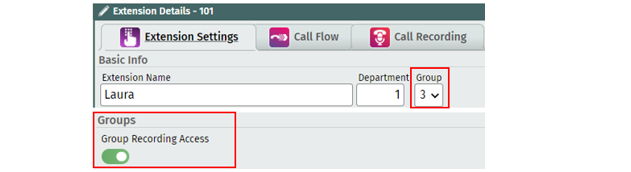
Select ‘1 - 9’ from the Group drop-down menu for the Group you wish to assign this extension to.
If desired, you can also allow the user of this extension to be able to access all call recordings related to calls made within this group by toggling on the Group Recording Access button.
Click Save
Repeat steps 1-5 on each extension until you have all extensions for your Group assigned.
Then, select an unused virtual extension and rename it (example: Call Group [#] for Shop)
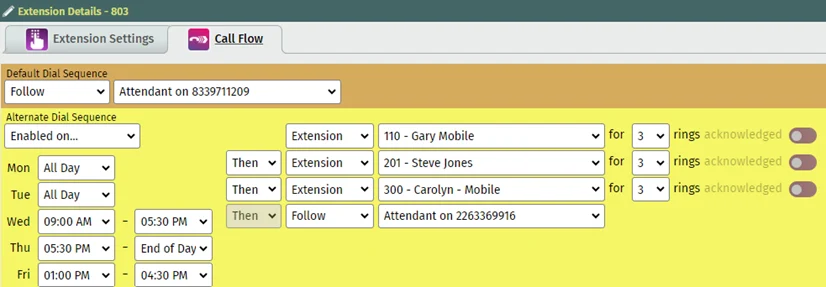
In the call flow tab, first set the Default Dial Sequence to “follow” and tell the calls where to go AFTER HOURS.
Then select the Alternative Dial Sequence – “Enabled on”.
Set the Days and Times of Work hours
Select the first extension to be called, as the first step and select “then” adding the second extension to be called in sequence (or “and” if simultaneously)
Ensure the final step is “then” and select an endpoint such as voicemail.
You can now add the virtual extension to the Telephone Number call flow being used for these incoming calls.
Visit the Telephone Number Basic Call Flow Article or the Telephone Number Auto Attendant Article for details.
Click Below for Additional Articles related to Extension Set Up Features:
Related Articles
Telephone Number Main Settings
How to Update Telephone Settings: For NEWTCF Administrators
Telephone Number Auto Attendant Set Up
How to set up your Auto Attendant: For NEWTCF Administrators
Extension Main Settings
How to Update Extension Setting : For NEWTCF Administrators
Extension Call Flow Handling Set Up
How to set up Extension Call Flows: For NEWTCF Administrators
Extension Detail Settings
How to Update Details within the Extension Screen
Text to Speech Recording Feature
Recording your AA menu, VM or ACD announcements
Telephone Number - Detail TN Settings
How to update Ring Tones and DISA settings