
Telephone Number Main Settings
Phone numbers are used differently by different companies. They may be used as a ‘Main Line’ that rings a receptionist or Automated Attendant, an “After Hours” number, Fax or as a Direct number to an extension.
Your Telephone numbers are added to your NEWT Business Phone by NEWT. Most settings are already pre-programmed, but some adjustments can be made. Check out the video tutorial or view the step by step instructions below.
Some settings cannot be updated, but other can and are highlighted in bold:
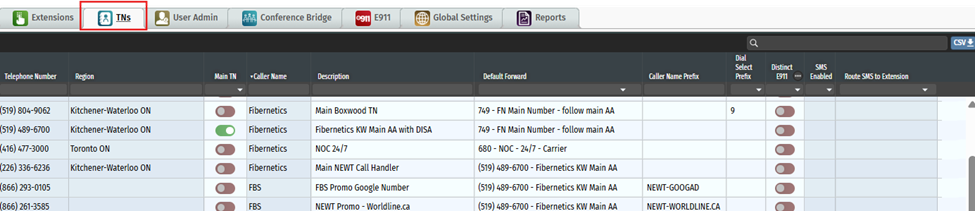
Telephone Number - Phone numbers are preloaded for you by your NEWT team.
Region – Which region the number is assigned to and being used in.
Main TN - This toggle indicates which number is your MAIN company telephone number. If toggled on, this number will also be interactively shown on the E911 tab as the default address for 911 response.
Caller Name – Caller ID (CNAM) for outbounds. When you make an outbound call, this name will show up on the receiver’s display - in front of your telephone number, so that they know who is calling them. Please note that Caller Name is updated by NEWT. Please contact NEWT Suport to request an update.
Description – Your internal description for the purpose of this phone number (i.e.: Conference Bridge).
Default Forward - The default forward will automatically be set to the very first extension number on the PBX. This should be updated to set which Extension or other phone number you are routing calls to, for each phone number on the PBX. Additional call flow set up can be completed within the TN Details Screen for each TN.
Caller Name Prefix – For inbound calls, otherwise known as “prepend”, this column indicates what information will show to the employee answering the phone. If multiple business names are on one PBX and only one receptionist, the Prefix will appear in front of the incoming caller ID on the receptionist’s phone display. This will assist a receptionist in knowing how to answer incoming calls.
Dial Sel Prefix – for outbound calls, if a different caller ID needs to be shown when making outgoing calls, a Dial Prefix can be used. Assign the Prefix code for this number. By entering this code before making your outbound call, this Phone Number Caller ID will be shown.
Distinct E911 - When this toggle is enabled, the corresponding telephone number (TN) will appear as a separate entity in the list on the E911 Tab. This feature will allow for separate 911 addresses per telephone number (if required). This is useful if the company is on two floors of a building where one of the floors has a number separate from that of the main floor or is at a separate site address altogether. See E911 Settings for further details.
TEXT Enabled – This number is being used for SMS/MMS texting on a NEWT MOBILE or DESKTOP App.
Route to Extension – This tells you which extension (or group of extensions) is using the Texting number.
Click Below for Additional Articles related to Telephone Number Set Up Features:
Related Articles
Telephone Number Auto Attendant Set Up
How to set up your Auto Attendant: For NEWTCF Administrators
Extension Main Settings
How to Update Extension Setting : For NEWTCF Administrators
Extension Call Flow Handling Set Up
How to set up Extension Call Flows: For NEWTCF Administrators
Extension Detail Settings
How to Update Details within the Extension Screen
Text to Speech Recording Feature
Recording your AA menu, VM or ACD announcements
Telephone Number - Detail TN Settings
How to update Ring Tones and DISA settings