
Telephone Number Caller ID Routing for Incoming Calls
Caller ID routing is a feature that directs incoming calls to different destinations based on the caller's phone number (Caller ID). It allows businesses to customize call handling based on the caller's identity, such as routing calls to specialized agents or automatically directing calls from certain geographic areas to specific local offices.
Call destinations can be set to go to any TN or Extension on the PBX.
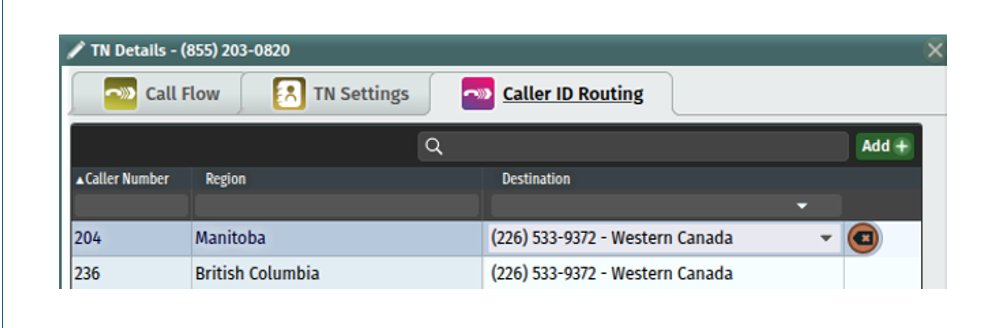
The example below shows call routing based on a geographic area for callers that dial a toll-free TN. If the call comes into 855-203-0820 and the caller is from area code 204 in Manitoba – the call will be routed to destination number 226-533-9372:
To set up Caller ID Routing:
From the TN Tab, clicking on the Pencil Icon at the end of the line item will guide you into the details screen of that Telephone Number.
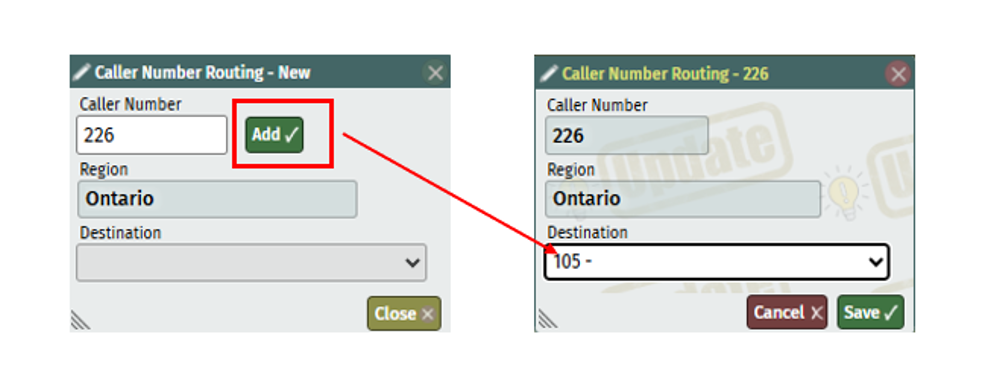
In the Caller ID Routing Tab, click on the add button.
Enter the caller ID to be routed. The caller number can be any number of digits between 1 and 10. These numbers are then processed in reverse order, so a match for 2345 takes precedent over a match for 234. Once done, you’ll notice the Region populates.
Click on the add button, then select the destination for the calls to go to. You can choose from any extension or phone number listed in the PBX.
Click the Save button in each window, then save and update the PBX to publish.
Click Below for Additional Articles related to Telephone Number Set Up Features:
Related Articles
Telephone Number Main Settings
How to Update Telephone Settings: For NEWTCF Administrators
Telephone Number Auto Attendant Set Up
How to set up your Auto Attendant: For NEWTCF Administrators
Extension Main Settings
How to Update Extension Setting : For NEWTCF Administrators
Extension Call Flow Handling Set Up
How to set up Extension Call Flows: For NEWTCF Administrators
Extension Detail Settings
How to Update Details within the Extension Screen
Text to Speech Recording Feature
Recording your AA menu, VM or ACD announcements
Telephone Number - Detail TN Settings
How to update Ring Tones and DISA settings