
NEWT MOBILE - Messages and Texting
Messages
Users can use the messaging feature to send instant chat messages to other NEWT Mobile or Desktop user extensions within your PBX environment, instead of calling them.
Texting
As an additional paid feature - TEXT Messaging to external cell phones can also be enabled on NEWT MOBILE or NEWT DESKTOP APPS and Group Texting is offered as well.
This included an assigned texting phone number added to the extension, or group of extensions and allows the capability of SMS and MMS (Multimedia Messaging Service) to send messages containing media beyond standard text, including images (JPG/JPEG, PNG, GIF), audio files, and longer text messages up to 1,600 characters.
Note that size of file transfer is dependant on the limitations as set by the Cell Provider. Because of strict carrier limits, high-resolution media will be heavily compressed. Services usually allow ~600K-1.3M files.
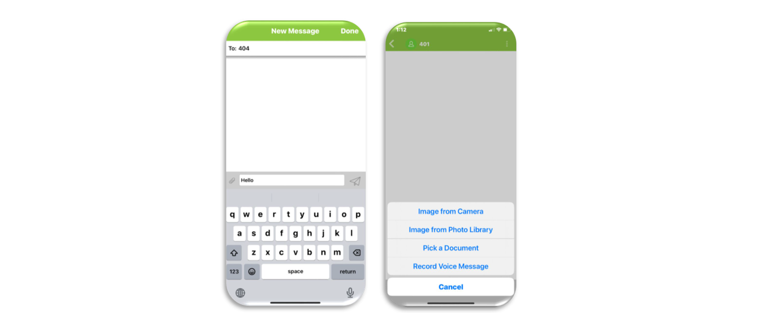
To start a new conversation:
Touch the Message icon at the bottom of the app and click on the window icon at the top right to start a new message.
Enter the PBX Extension Number (or cell phone number if texting is enabled) or Tap the + icon to select a saved contact from your address book or an extension from the Global directory.
Compose a message in the section where the airplane icon sits.
Attach files using the paperclip,
Tap the paper airplane icon to send.

Click Below for Additional Articles related to NEWT Mobile Guides
Related Articles
NEWT Handset Training Videos
User Training Video's for Business Phones
Grandstream DP720 Mobile DECT Handset with 750 Base Station
DP720 with 750 Base Station User Guide
How to Update your MS Teams Call Settings
Call Settings Optional Instructions for Users
Grandstream GDS3705 Door Phone
GDS3705 Door Phone Information Guide
Grandstream GBX20 Expansion Module
Quick Start Set up Guide
Grandstream GRP2624
Grandstream GRP2624 Quick Start Guide
Grandstream GRP2615
Grandstream GRP2615 Quick Start Guide