
Grandstream GBX20 Expansion Module
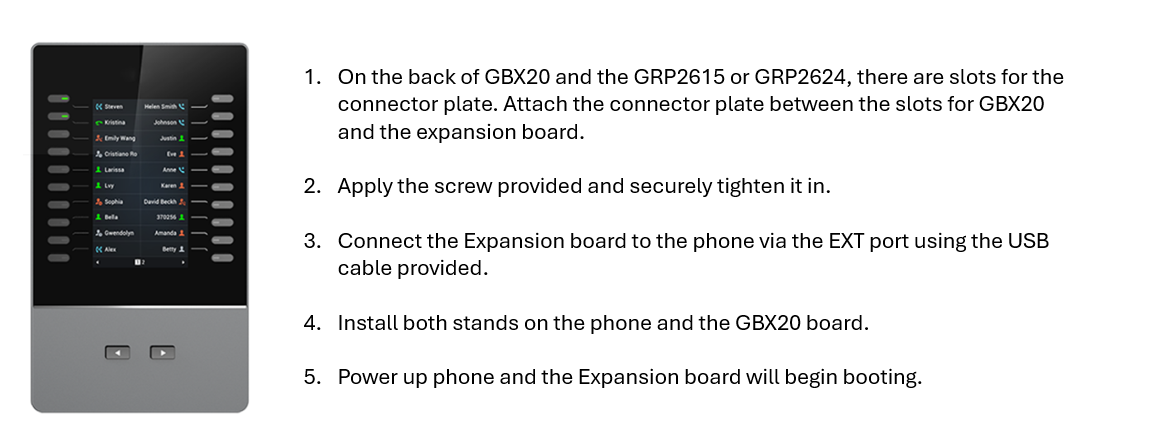
Connecting the GBX20 Expansion Module
Configuring the GBX20 Expansion Module
The GBX20 keys can be configured in the NEWTCF PBX using the following method:
For Grandstream Only:
In your NEWTCF interface, navigate to the Extension Tab.
Find the Extension associated to the phone this module is attached to.
Clicking on the pencil icon beside the extension line item will bring you to the Extension Details screen where you can adjust single extension details.
Navigate to the Hardware Settings Tab. This tab is shown only when this extension is set as a Grandstream Model Desk Phone.
If you have more than one Expansion Module, first select which module to start programming, from the drop-down menu.
Add programmable keys:
For Instance, on the first screen of the phone using the 1st line key – The user wants this to be a speed dial.
They want the second key on the first screen to show Dmitry’s extension when it is busy or available using the busy lamp field (BLF) feature. They want the 3rd Key on the first screen to be a line key so that the user can pick up another call on that line.
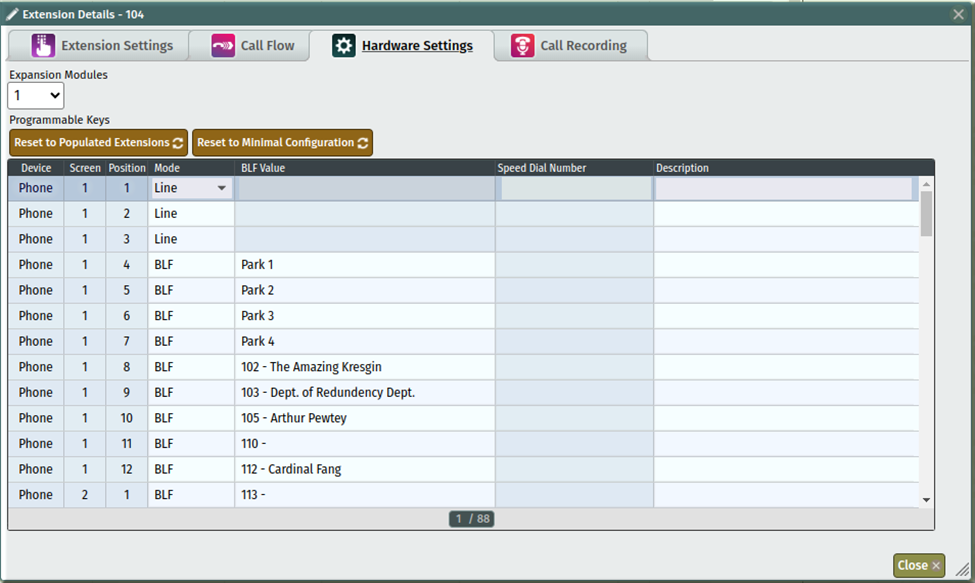
Once you’ve set up each key they way the user wants it, click save on this screen and then update the PBX.
Users will need to reboot their phones by:
Unplugging the Ethernet cable (which often provides power via PoE) and the power adapter (if applicable).
Wait 10 to 15 seconds.
Plug the cables back in and allow the phone to boot up.
Related Articles
NEWT Handset Training Videos
User Training Video's for Business Phones
Grandstream DP720 Mobile DECT Handset with 750 Base Station
DP720 with 750 Base Station User Guide
How to Update your MS Teams Call Settings
Call Settings Optional Instructions for Users
Grandstream GDS3705 Door Phone
GDS3705 Door Phone Information Guide
Grandstream GRP2624
Grandstream GRP2624 Quick Start Guide
Grandstream GRP2615
Grandstream GRP2615 Quick Start Guide