
Call Recordings SFTP File Access
Secure access to call recording files is available via SFTP transfer. This functionality allows file access for all call recording enabled NEWT PBXs with a secure and remotely accessible solution.
The credentials required for SFTP access are generated for Administrators using their NEWTCF username and password combinations.
Access is granted to NEWTCF Administrators by toggling on the "SFTP Access" switch for the administrator. Please contact the NEWT support team or your NEWT Business Phone provider for access.
Once credentials are enabled, administrators can find the SFTP site link on top of the Call Recording tab under the Reports tab:
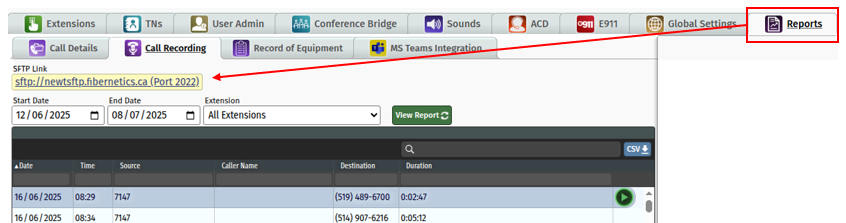
To access the SFTP site, users will need to have an SFTP client installed locally. A list of SFTP Windows clients can be found here: https://www.sftp.net/clients#windows
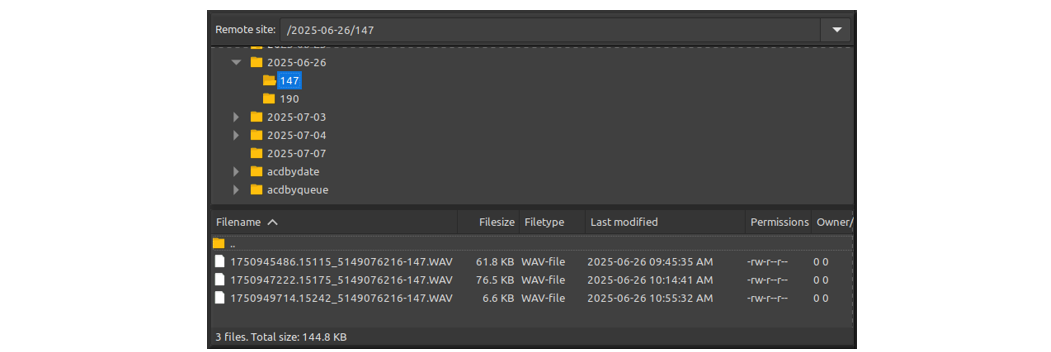
The SFTP site lists all locally recorded PBX files by date and extension. If the PBX has ACD enabled, then ACD call recording files are also available both by date and by queue.
Related Articles
Telephone Number Main Settings
How to Update Telephone Settings: For NEWTCF Administrators
Telephone Number Auto Attendant Set Up
How to set up your Auto Attendant: For NEWTCF Administrators
Extension Main Settings
How to Update Extension Setting : For NEWTCF Administrators
Extension Call Flow Handling Set Up
How to set up Extension Call Flows: For NEWTCF Administrators
Extension Detail Settings
How to Update Details within the Extension Screen
Text to Speech Recording Feature
Recording your AA menu, VM or ACD announcements
Telephone Number - Detail TN Settings
How to update Ring Tones and DISA settings