
NEWT Nitro FTTP - BYOD Option
Customers purchasing NEWT NITRO (FTTP Internet Services) who have chosen the BYOD option are provided with the following tips below, to assist in installation:
The BYOD option is a data-only service with no network equipment provided and no troubleshooting capabilities. This is a self-service option available for businesses that supply their own networking hardware and structure that can troubleshoot by themselves.
Please note that NEWT Support for this option is limited to checking to see if the connection is running. All other troubleshooting related to the network (ie: Ping, NAT verification, bandwidth usage etc..), is under the customers control, as it relates to their network.
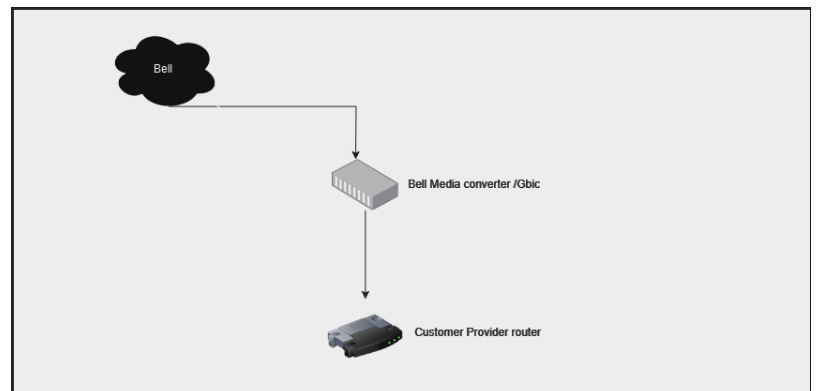
The infrastructure provided / Bell dmarc will vary depending on the speeds.
a. Speeds 1.5gb or lower will be serviced with an SFP
b. 3G will be serviced by a Nokia media converter.
The customer will provide their router directly connected to Bell Demarc.
Points to consider:
Ensure your router supports SFP if applicable.
For optimal performance, see that your router supports the speeds ordered.
For optimal performance, see that your network infrastructure supports the speeds ordered ( ie. Cat6 ethernet cable to include from dmarc to the your router, your switching environment etc )
Note that internet speeds will be ultimately impacted by any device which cannot match the throughput. For example, if you are connecting a computer device behind a phone and the phones’ throughput is limited, this will limit the speeds your computer can access. In this example, the phone will bottleneck the internet speeds your computer can leverage.
When pairing NEWT Nitro BYOD with NEWT voice please make sure that PPOE is configured on vlan40 in your router to ensure sync with Bell.
Topology
Related Articles
GDS3705 Door Phone Set Up
Set up and Configuration Information
Client Router / Firewall Settings
Customer Network Guidelines for 3rd party Internet Access (ALT ACCESS)
Jabra Evolve 65 Bluetooth Headset Setup
How to connect your Evolve 65 with your NEWT GXP2170
Poly Voyager B5200 Bluetooth Headset Setup
How to connect your B5200 with your NEWT GXP2170
GXP2170 Headset Compatibility Information
Learn about recommended headsets for your NEWT GXP2170