
ACD Admin - Agent Settings
Configure queue membership and skills-based routing settings related to your agents. Please note you can set up as many agents as you’d like, but the number of agents that can log into queues at the same time is dependent on the number of active agents licenses you purchased.
Agents will be listed by their NEWT PBX Extension Number and Name and can be sorted several ways by clicking on the column header you want to sort by and using a drop-down arrow to filter, or by typing in characters to search for, under the column header. Below are the details of each column definition and how it can be set.
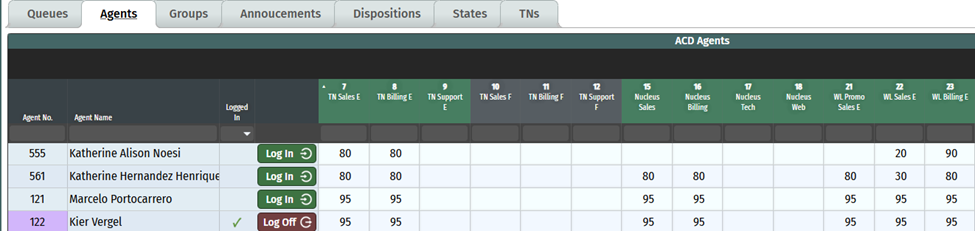
Agent No. – indicates the extension assigned to the agent upon set up. You will notice the extension of agents that are logged in to the queue are highlighted.
Agent Name – assigned name on this extension.
Logged in – This is green if the agent is logged into the queue. You’ll notice a drop-down arrow at the top of the column, allowing you to filter. The column next to this is interactive. You can log an agent on or off by clicking on the available Log In/Log Off icon. Note that agents can easily log in or out of their assigned queue(s) by simply dialling the standard log in code – 88008 or using a programmed agent key on desk phones.
Assigning an Agent to Queues:
Assign an agent to a queue simply by assigning an Agent a number in the desired queue as explained below:
You’ll notice in the above example, there are numbers assigned to agents. You need to add a number to the agent, within the queue you want them to be in.
The number you give them, represents priority skills-based agent call routing determination which is designed to route queued calls to the agent in the best position to answer them. The rating system is from 1 to 99, with 99 being the highest priority. If there are multiple agents assigned to a queue and all are in an accepting calls state, then calls will be priority-distributed to agents based on their skill number, in conjunction with the Queue Ring Strategy assigned.
An agent may have different ratings for each queue they participate in, and assigning the same number for all agents in a particular queue will negate any skills-based priority function for that queue.
Please note that if you don't see the agents extension in the list under the Agent tab, it's likely because this extension has not been "enabled" for ACD. In that case, please contact your NEWT PBX provider to enable this on the extension.
External Forwarding Feature - Note that if you have an agent that wants to have calls go through the ACD and forward to an external phone number (+ ext.), this can be set up by NEWT by adding a “Forward” Type Extension to the PBX, then add the extension to the appropriate queue (s) as per above. The extension will need to be logged into the ACD via a supervisor in their monitoring screen or admin in the ACD Settings - Agent Tab. Please contact your NEWT Representative (extension purchase required) for this set up.
Related Articles
ACD ADMIN - Call Flow Set Up for QUEUES
Setting up your Call Flow for Queue Routing
NEWT ACD Call Insights
Call Insights and Transcripts
ADC Admin - Supervisor Access for Monitoring
How to give access to users for ACD Monitoring and Reporting
ACD Admin - Agent Console Access Set Up
Providing User Access to the ACD Agent Console
ACD Admin - TN Settings
Administering your NEWT PBX Automatic Call Distribution
ACD Admin - Work States Settings
Administering your NEWT PBX Automatic Call Distribution
ACD Admin - Dispositions Settings
Administering your NEWT PBX Automatic Call Distribution