
NEWT ACD Call Insights
As an additional paid feature set, NEWT provides Call Insights with transcripts on the ACD. This tool provides AI Generated insights and transcriptions for excellent call performance analysis.
By summarizing the call into resolution performance categories and customer sentiments, you achieve a great understanding of overall call quality at a glance.
Zero into areas that require attention quickly, without needing to dedicate hours listening to every call independently.
Benefits
Operational Efficiency & Cost Savings: Eliminates manual call review, saving time and reducing errors.
Improved Issue Resolution & Faster Handling Times: Analyzes call patterns and customer sentiment to surface common issues. By converting raw call data into structured insights, agents gain visibility into types of issues and recurring customer pain points.
More Effective Coaching & Consistent Service Quality: AI surfaces agent performance metrics, such as talk‑to‑listen ratios, handling effectiveness, and how well they follow service protocols. This drives targeted training and consistent service delivery across all agents.
AI Insights Reports
This additional feature can be seen, once purchased and turned on, within the ACD platform in the ACD Reports
Within the ACD Reports Tab, navigate to the Call Details Tab.
Select the dates and queue or specific agent you’d like to pull information from.
Then click on View Report.
The Resulting screen looks like this, where you will find the Insights sub tab, that holds the Call Insights Summary for each call:
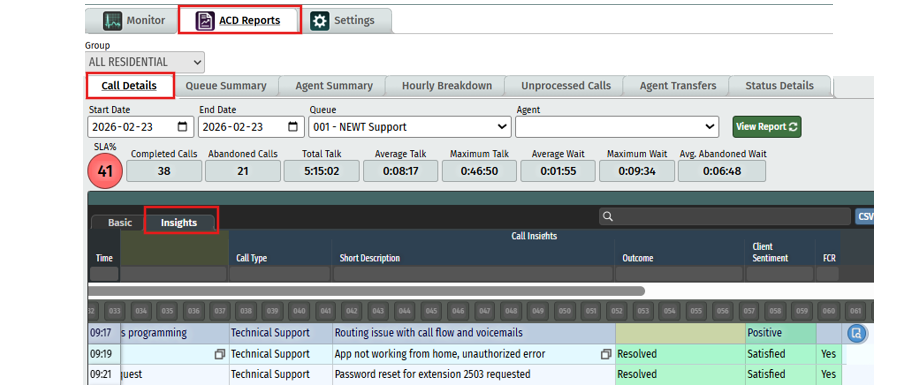
Call Type – this is intelligently categorized based on the general theme or subject of the call. In the support queue for instance, you may see call types such as technical support or feature impairment whereas in a finance queue you may see billing or cancellation as the call type.
Short Description – Similar to a subject line of an email, this is a short description of the call generated by the AI after analysing the full call, using key words.
Outcome – The AI will make a determination of the final outcome of the call, after analysing the full call. You may see outcomes such as “resolved” or “resolved pending follow up” or “unresolved”. Unresolved calls will be highlighted in red, to help bring attention to the call for further action.
Client Sentiment – The AI will capture the tone of the call as well as words used, to determine the overall emotion, attitude and opinion of the customer. You may see results such as positive, grateful, satisfied, neutral, relieved, patient, resigned or frustrated. Frustrated calls will be highlighted in red, to help bring attention to the call for further action.
FCR – this stands for First Call Resolution and is listed as yes or no to simply analysis this Key Performance Indicator.
You’ll notice there is a CSV button that allows you to download this report into a workable spreadsheet for further report structuring.
Per Call Details, Transcripts and Call Recordings
At the very end of the call line item, you can see a blue icon for Call Details .
Clicking on this icon will bring up the full call details, more insights and a transcription produced by the AI along with the recorded call you can listen to.

You can see further details regarding the initial sentiment of the caller and their final sentiment as well as action steps the agent has taken for resolution.
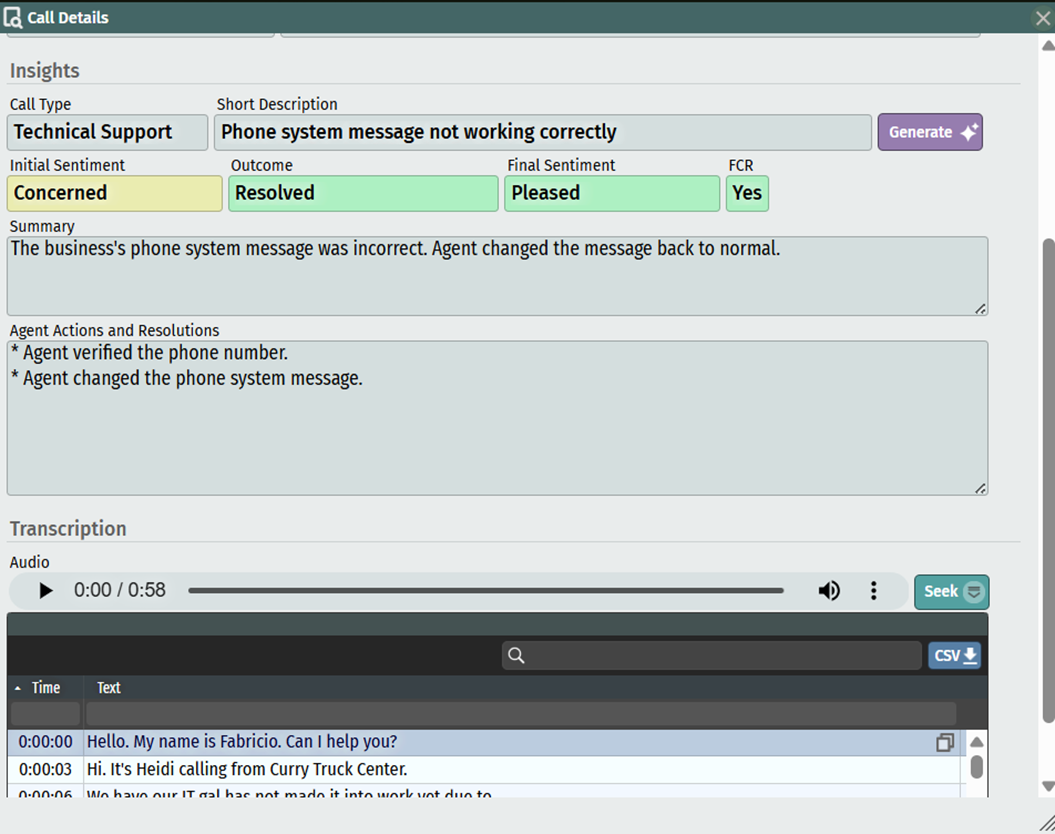
Generate - if insights or transcriptions have not been captured yet (sometimes more lengthy calls are left to be processed overnight) you can manually force the process by hitting the Generate Button manually.
Seek - If you want to listen to a specific area of the call, you can select the transcript sentence you want to go to and click on the Seek button. You’ll notice that the audio jumps to the time stamp of that sentence. Hit Play to listen from there.
CSV Download - Additionally, transcripts can be downloaded to csv or you can copy/paste to other record keeping methods you may use.
As a quick reminder, we understand that AI is not always perfect. It tries its best, but that doesn’t mean you won’t find the occasional error in transcription or analysis.
Related Articles
ACD ADMIN - Call Flow Set Up for QUEUES
Setting up your Call Flow for Queue Routing
ADC Admin - Supervisor Access for Monitoring
How to give access to users for ACD Monitoring and Reporting
ACD Admin - Agent Console Access Set Up
Providing User Access to the ACD Agent Console
ACD Admin - TN Settings
Administering your NEWT PBX Automatic Call Distribution
ACD Admin - Work States Settings
Administering your NEWT PBX Automatic Call Distribution
ACD Admin - Dispositions Settings
Administering your NEWT PBX Automatic Call Distribution